

Web Intents from Twitter
At the end of March Twitter released a cool new feature called “Web Intents”. I didn’t really see the value of it till recently, but I’ve now started using it way more. When you have a Tweet button on your site, you’re already using the Web Intents API, but you can do way more cool things. Check out the Twitter integration on the top left of this site, which looks like this:

There are three things in that integration that should catch your eye. If you click on “Yoast”, that’s what Twitter calls a “follow intent”. So when you click on that link, Twitter generates a popup that looks like this:
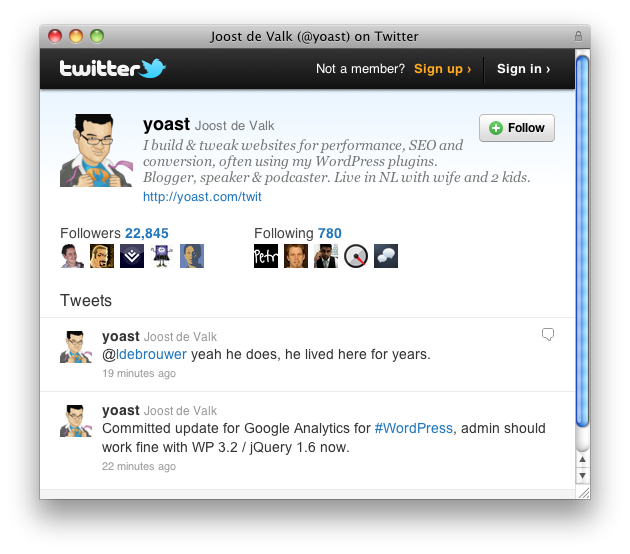 I think that’s pretty cool. You’re welcome to disagree, of course, but then you might as well stop reading now. Twitter generates similar popups when you click on the retweet and reply buttons, right behind the text of the tweet.
How to create Web Intents
Creating these Web Intents is hilariously easy. You need the normal JS library that you have for the follow and tweet buttons, so there’s no need to include anything else. Here it is:
[code lang=”html” light=”true”]<script type="text/javascript" src="http://platform.twitter.com/widgets.js"></script>[/code]
Then, a “follow intent” link, is crafted as easily as this:
[code lang=”html” light=”true”]<a href="https://twitter.com/intent/user?screen_name=yoast">Yoast</a>[/code]
That’s easy right? That’s all you need to do. Let’s check the other web intents, starting with the retweet intent:
[code lang=”html” light=”true”]<a href="http://twitter.com/intent/retweet?related=yoast&tweet_id=<ID>">[/code]
All you have to do is replace the <ID> with the tweet to be retweeted. A reply intent is crafted just as easily:
[code lang=”html” light=”true”]<a href="http://twitter.com/intent/tweet?related=yoast&in_reply_to=<ID>">[/code]
There’s no need to use extra JavaScripts, write extra code, nothing. Feel free to just use this in your theme, your posts, wherever and Twitter’s script will change it for you. In their documentation for Web Intents, Twitter provides you with images to use as well, which I’m using too, as you can see.
Now I’d like to hear from you! Do you have creative ways of using Web Intents?
Introduction to Yoast SEO webinar
A practical, demo-driven webinar on using Yoast SEO for WordPress with confidence.
All Yoast SEO WebinarsWordCamp Rajasthan 2026
Team Yoast is Attending, Sponsoring at WordCamp Rajasthan 2026! Click through to see who will be there, what we will do, and more!
See where you can find us nextThe SEO Update by Yoast – September 2026
Expert analysis of the latest SEO & AI news developments with Carolyn Shelby and Alex Moss. Watch the update here. 📺
All Yoast SEO Podcasts
Discussion (23)